Latest news, tutorials, previews and tips about FotoSketcher, the free program to turn photos into sketches and paintings.
To download go to www.fotosketcher.com
Sunday, March 20, 2011
New beta available
A new beta version has been uploaded. You can get it here: http://www.fotosketcher.com/FotoSketcher_beta.exe
The painting 8 filter has been fine tuned and is close to final.
All the best,
David
Tuesday, March 8, 2011
FotoSketcher 2.10 - early beta available
Hi!
I've just uploaded a new beta version of FotoSketcher 2.10 if you want to play with the new Painting 8 (expressive brushstrokes) effect. You can download it here: http://www.fotosketcher.com/FotoSketcher_beta.exe
The new effect is very processor intensive, so despite some optimizing it still takes a while to run. I suggest you don't use it on larger images ;-)
Here is an example of the new filter:

Don't hesitate to let me know what you think!
All the best,
David
I've just uploaded a new beta version of FotoSketcher 2.10 if you want to play with the new Painting 8 (expressive brushstrokes) effect. You can download it here: http://www.fotosketcher.com/FotoSketcher_beta.exe
The new effect is very processor intensive, so despite some optimizing it still takes a while to run. I suggest you don't use it on larger images ;-)
Here is an example of the new filter:

Don't hesitate to let me know what you think!
All the best,
David
Monday, February 21, 2011
Upcoming new effect: expressive brushstrokes
Hi all,
Still working on a new algorithm which uses brushtrokes (like the Painting 7 effect), but with a completely different stroke placement.
I think it gives a nicely expressive touch to the painting. Here is an example (click on the picture to enlarge):

I hope you'll like it.
Best regards,
David
Still working on a new algorithm which uses brushtrokes (like the Painting 7 effect), but with a completely different stroke placement.
I think it gives a nicely expressive touch to the painting. Here is an example (click on the picture to enlarge):

I hope you'll like it.
Best regards,
David
Tuesday, February 15, 2011
Testing new ideas
Hi all,
I'm currently experimenting (fooling around) with new algorithms ideas. Here is an example on the famous parrot:
It's early days yet, but I think it could be promising.
All the best,
David
I'm currently experimenting (fooling around) with new algorithms ideas. Here is an example on the famous parrot:
It's early days yet, but I think it could be promising.All the best,
David
Tuesday, February 8, 2011
A fun time waster
As if you didn't waste time enough as it is with FotoSketcher, here is a piece of totally useless fun (crank up your speakers and click on the following image) :

Enjoy ;-)

Enjoy ;-)
Monday, January 10, 2011
FotoSketcher tutorial - how to apply multiple effects on the same photo
Here is a step by step tutorial on how you can apply two different filters on the same image, using FotoSketcher 2.00.
Step 1:
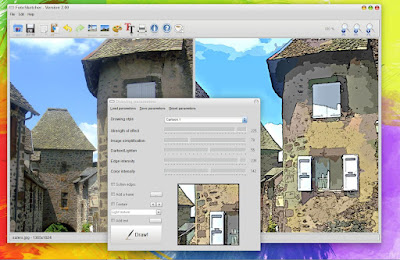
Open a photo and apply your first effect (here Cartoon 1).
Step 2:
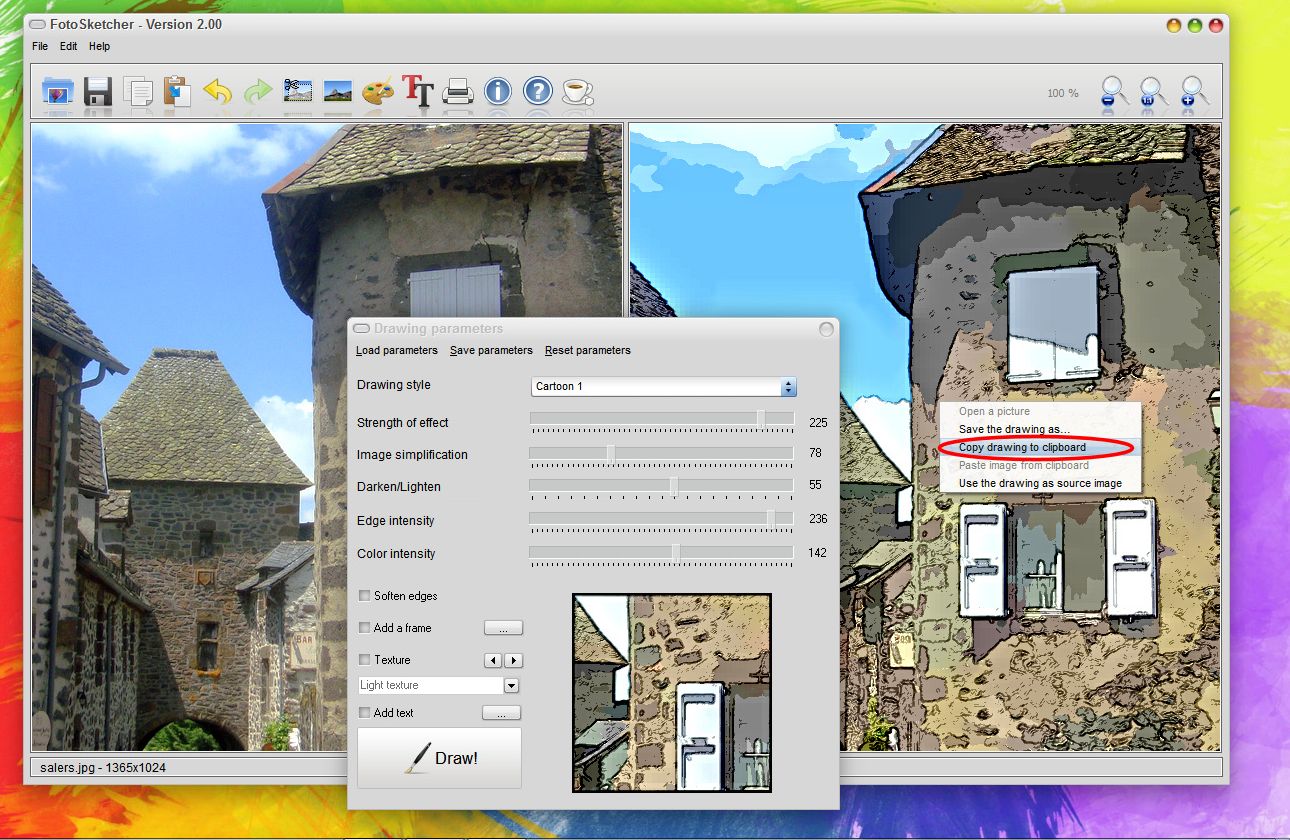
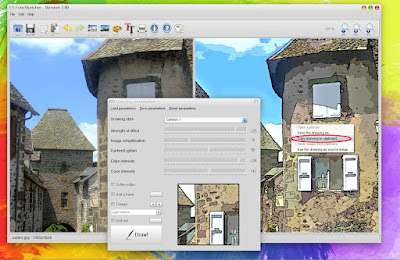
Then copy the resulting image to the clipboard (either by right-clicking on the drawing and choosing 'Copy drawing to clipboard', or by pressing CTRL+C or by clicking on the third icon in the toolbar).
Step 3:
Now apply your second filter (here Painting 6 - oil painting, with increased brushstrokes intensity).
Once the painting is finished, paste the previous cartoon image from the clipboard (either by pressing CTRL+V or right-clicking on the first image and choosing 'paste image from clipboard' or click on the fourth icon in the toolbar, as shown here).
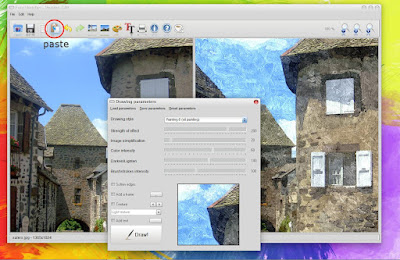
Step 4:
The Cartoon image you had created in step 1 is pasted in both panes. Your oil painting has disappeared, but no panic, this is normal.
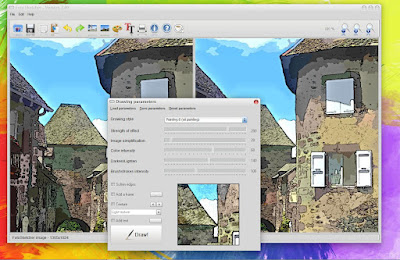
Step 5:
Just click on the undo icon (as shown) or press CTRL+Z.
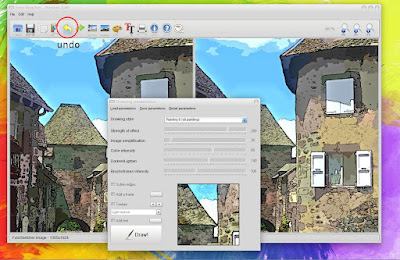
Step 6:
Now the cartoon image in on the left and the oil painting is on the right. The final step is to choose the 'Merge source and result images' effect and voila!
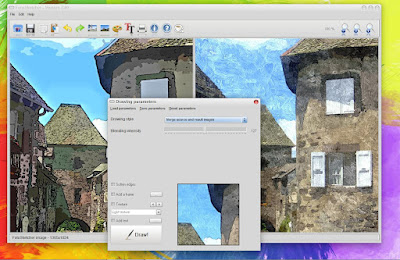
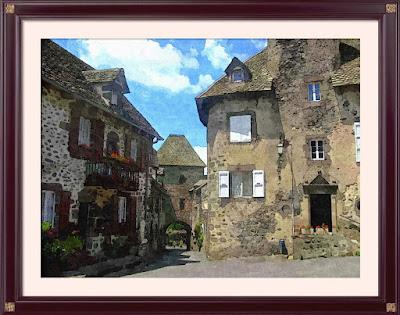
The result:
With a frame and texture added.
I hope you enjoyed this tutorial!
Best regards,
David
Step 1:
Open a photo and apply your first effect (here Cartoon 1).

Step 2:
Then copy the resulting image to the clipboard (either by right-clicking on the drawing and choosing 'Copy drawing to clipboard', or by pressing CTRL+C or by clicking on the third icon in the toolbar).

Step 3:
Now apply your second filter (here Painting 6 - oil painting, with increased brushstrokes intensity).
Once the painting is finished, paste the previous cartoon image from the clipboard (either by pressing CTRL+V or right-clicking on the first image and choosing 'paste image from clipboard' or click on the fourth icon in the toolbar, as shown here).

Step 4:
The Cartoon image you had created in step 1 is pasted in both panes. Your oil painting has disappeared, but no panic, this is normal.

Step 5:
Just click on the undo icon (as shown) or press CTRL+Z.

Step 6:
Now the cartoon image in on the left and the oil painting is on the right. The final step is to choose the 'Merge source and result images' effect and voila!

The result:
With a frame and texture added.
I hope you enjoyed this tutorial!Best regards,
David
Saturday, January 1, 2011
For the New Year... FotoSketcher 2.00 finally released
Happy New Year to all!

After months of hard toil FotoSketcher 2.00 is finally available for download (http://www.fotosketcher.com/download.htm).
I am especially endebted to all the users who provided me with feedback, suggestions and encouragement.
And also a very special thank you to the people who translated FotoSketcher: Zdeněk, Date, Ari, Josef, Luca, cienislaw, Andrei and Bela.
What's new in v 2.00:
I hope you'll have fun with the new FotoSketcher :-)
All the best,
David

After months of hard toil FotoSketcher 2.00 is finally available for download (http://www.fotosketcher.com/download.htm).
I am especially endebted to all the users who provided me with feedback, suggestions and encouragement.
And also a very special thank you to the people who translated FotoSketcher: Zdeněk, Date, Ari, Josef, Luca, cienislaw, Andrei and Bela.
What's new in v 2.00:
- 10 languages in all (English, French, German, Czech, Polish, Italian, Romanian, Dutch, Finnish, Russian)
- Crop source or drawn image
- Lossless 90° rotation
- Improved and more responsive interface (12 skins, flicker-free icons, real-time preview of brushstrokes)
- One-click automatic contrast adjustment
- Check for updates
- Automatic saving of language, window size, position and chosen skin
- 4 new realistic frames
- New custom brushes loading for Painting 7 effect
- New vintage photo effect (sepia, vignette, old photo texture)
I hope you'll have fun with the new FotoSketcher :-)
All the best,
David
Saturday, December 25, 2010
New beta available - FotoSketcher Christmas edition ;-)
Season's greetings to all!
I've just uploaded a new beta version of FotoSketcher 2.00 (http://www.fotosketcher.com/FotoSketcher_beta.exe).
This version now supports 9 languages. I've ironed out a lot of small bugs and made the interface more responsive.
In Painting 7, if you want to get a much higher number of brushstrokes (warning, this will be slow), you can double-click on the number of brushstrokes (to the right of the slide bar):
Apart from some more work that needs to be done internally on the undo/redo feature, this beta is very close to release. Unless of course, someone finds more bugs!
All the best,
David
I've just uploaded a new beta version of FotoSketcher 2.00 (http://www.fotosketcher.com/FotoSketcher_beta.exe).
This version now supports 9 languages. I've ironed out a lot of small bugs and made the interface more responsive.
In Painting 7, if you want to get a much higher number of brushstrokes (warning, this will be slow), you can double-click on the number of brushstrokes (to the right of the slide bar):
Apart from some more work that needs to be done internally on the undo/redo feature, this beta is very close to release. Unless of course, someone finds more bugs!All the best,
David
Tuesday, December 14, 2010
Calling for a little help (translating FotoSketcher)
Hi all,
Thanks to some kind users, FotoSketcher will soon be available in English, French, German, Italian, Russian, Polish and Czech (and maybe more).
If you are willing to translate into other languages (or know someone who might) I would be very grateful if you could contact me.
Of course your name would appear in the credits section of the program: you'll be famous ;-)
There are around 180 words or short sentences to translate. If you are courageous enough to undertake this translating task, please don't hesitate to drop me a line at contact@fotosketcher.com
Best regards,
David
Thanks to some kind users, FotoSketcher will soon be available in English, French, German, Italian, Russian, Polish and Czech (and maybe more).
If you are willing to translate into other languages (or know someone who might) I would be very grateful if you could contact me.Of course your name would appear in the credits section of the program: you'll be famous ;-)
There are around 180 words or short sentences to translate. If you are courageous enough to undertake this translating task, please don't hesitate to drop me a line at contact@fotosketcher.com
Best regards,
David
Thursday, December 9, 2010
FotoSketcher 2.00 early beta available
Hi all,
As promised I have just uploaded an early beta of FotoSketcher 2.00. Here is the download link: http://www.fotosketcher.com/FotoSketcher_beta.exe
It is still a bit rough around the edges and only supports English and French for the time being. The undo/redo function is also a little bit funny sometimes.
BUT apart from that it is perfectly usable and as far as I know stable.
Now for the goodies! The new features present are:
All the best,
David
As promised I have just uploaded an early beta of FotoSketcher 2.00. Here is the download link: http://www.fotosketcher.com/FotoSketcher_beta.exe
It is still a bit rough around the edges and only supports English and French for the time being. The undo/redo function is also a little bit funny sometimes.
BUT apart from that it is perfectly usable and as far as I know stable.
Now for the goodies! The new features present are:
- Crop
- Rotate (in 90° increments, lossless)
- improved interface (12 skins and flicker-free icons)
- one-click automatic contrast adjustment (based on histogram stretch and unsharp mask)
- check for updates
- automatic saving of window size, position and chosen skin
- 4 new realistic frames
- more responsive preview
- new custom brushes loading for Painting 7 effect
- new old photo effect (sepia, vignette, old photo texture)
All the best,David
Subscribe to:
Posts (Atom)