Hi all,
Since making FotoSketcher version 2.25 beta available, some users were reporting crashes when trying to launch the program.
Despite testing on 6 different PCs, I had been unable to reproduce the problem.
Therefore, I added some code to do exception handling and thanks to the help of many users (and especially Peter from British Columbia!) I finally tracked down the problem to some corrupt components. For once, my code was not the culprit! After replacing these components, the bug finally disappeared. The current beta version can be downloaded here: http://www.fotosketcher.com/FotoSketcher_beta.exe
I still have a few changes to make, but I should soon be able to upload a release candidate of version 2.25. Stay tuned!
Thank you very much again for your help,
David
Saturday, January 7, 2012


Thursday, January 5, 2012
FotoSketcher 2.25 beta available
Hi all,
I have just uploaded a beta version of FotoSketcher 2.25.
You can get it here: http://www.fotosketcher.com/FotoSketcher_beta.exe
Apart from a few bug fixes, the main new feature is the 'Emergence' effect (an evolution of the 'shattered glass' filter).

As usual, I welcome your feedback and would be glad to hear from you if you find any bugs!
All the best,
David
I have just uploaded a beta version of FotoSketcher 2.25.
You can get it here: http://www.fotosketcher.com/FotoSketcher_beta.exe
Apart from a few bug fixes, the main new feature is the 'Emergence' effect (an evolution of the 'shattered glass' filter).

As usual, I welcome your feedback and would be glad to hear from you if you find any bugs!
All the best,
David
Friday, December 30, 2011
New shattered glass effect
Hi all,
Just a quick word to let you know that I am also experimenting with a simple effect that I will probably call "shattered glass" or something similar.
Here is an early example (click on image to view in full size):
 Best regards,
David
Just a quick word to let you know that I am also experimenting with a simple effect that I will probably call "shattered glass" or something similar.
Here is an early example (click on image to view in full size):

David
Saturday, December 24, 2011
Season's greetings!
Hi all,
I was hoping to release a new version of FotoSketcher in time for Christmas, but unfortunately I am running behind. My experiments with a new algorithm did not produce good enough results for me to include a new filter in FotoSketcher. I might even have to abandon the ideas I've been working on lately and start on new ones (no worries, I have lots of new ideas, one of them might even produce something nice, lol).
In the meantime, here is the result of one of my latest experiments (based on a picture of young Sean Connery):

I wish you all happy holidays!
All the best,
David
I was hoping to release a new version of FotoSketcher in time for Christmas, but unfortunately I am running behind. My experiments with a new algorithm did not produce good enough results for me to include a new filter in FotoSketcher. I might even have to abandon the ideas I've been working on lately and start on new ones (no worries, I have lots of new ideas, one of them might even produce something nice, lol).
In the meantime, here is the result of one of my latest experiments (based on a picture of young Sean Connery):

I wish you all happy holidays!
All the best,
David
Saturday, December 10, 2011
Working on some new ideas
Hi all,
I'm currently exploring some new ideas based on the brushstrokes algorithm. I've changed the way the brushstrokes are placed and added a new 'overlap' concept in the code. That way I can choose how much the various brushstrokes are allowed to overlap each other.
It's still early days and the results are not yet completely convincing, but I think I am on an interesting track. Here is an example:

I'll keep you posted as I make progress, so stay tuned!
All the best,
David
I'm currently exploring some new ideas based on the brushstrokes algorithm. I've changed the way the brushstrokes are placed and added a new 'overlap' concept in the code. That way I can choose how much the various brushstrokes are allowed to overlap each other.
It's still early days and the results are not yet completely convincing, but I think I am on an interesting track. Here is an example:
I'll keep you posted as I make progress, so stay tuned!
All the best,
David
Monday, November 21, 2011
FotoSketcher for Mac - proof of concept
Hi all,
It's been a rather long time since I last updated this blog and I apologize to all my faithful followers. I know that you can't wait to know what's coming in the next release of FotoSketcher ;-)
First of all, I've busy rewriting the official website (http://www.fotosketcher.com/) which was in serious need of an overhaul. To cut a rather long story short, I installed and learned Wordpress, chose a nice, clean looking theme and voila!
Then, after some severe lobbying from Mac users ;-), I decided that I would start looking into Mac development. Fortunately, my programming environment Delphi had just been updated to support Mac OS. So I decided to invest in the latest version (Embarcadero Delphi XE2), purchased a (not so) cheap old Mac Mini with 512MB of RAM and tried to start programming for the Mac. Alas, I soon discovered that I needed to upgrade to Snow Leopard (the minimum for Delphi XE2) and that requires 2GB of RAM!
So, following this great tutorial http://www.methodshop.com/gadgets/tutorials/macmini-ram/index.shtml and miraculously not screwing things up, I finally installed Mac OS X Snow Leopard.
And tonight I set up everything to try compiling a test program on my Mac. It actually worked the first time (I nearly fell off my chair)!! Here is proof of my first program running on a Mac:

The snag is that in order to make FotoSketcher multi-platform, I will need to rewrite the user interface and probably quite a lot of the "under the hood"code. So I'll probably continue updating the current Windows only version in parallel for a while.
Best regards,
David
It's been a rather long time since I last updated this blog and I apologize to all my faithful followers. I know that you can't wait to know what's coming in the next release of FotoSketcher ;-)
First of all, I've busy rewriting the official website (http://www.fotosketcher.com/) which was in serious need of an overhaul. To cut a rather long story short, I installed and learned Wordpress, chose a nice, clean looking theme and voila!
Then, after some severe lobbying from Mac users ;-), I decided that I would start looking into Mac development. Fortunately, my programming environment Delphi had just been updated to support Mac OS. So I decided to invest in the latest version (Embarcadero Delphi XE2), purchased a (not so) cheap old Mac Mini with 512MB of RAM and tried to start programming for the Mac. Alas, I soon discovered that I needed to upgrade to Snow Leopard (the minimum for Delphi XE2) and that requires 2GB of RAM!
So, following this great tutorial http://www.methodshop.com/gadgets/tutorials/macmini-ram/index.shtml and miraculously not screwing things up, I finally installed Mac OS X Snow Leopard.
And tonight I set up everything to try compiling a test program on my Mac. It actually worked the first time (I nearly fell off my chair)!! Here is proof of my first program running on a Mac:

The snag is that in order to make FotoSketcher multi-platform, I will need to rewrite the user interface and probably quite a lot of the "under the hood"code. So I'll probably continue updating the current Windows only version in parallel for a while.
Best regards,
David
Saturday, September 3, 2011
New version 2.20 officially released
Hi all,
FotoSketcher 2.20 is now officially released and can be downloaded here: http://www.fotosketcher.com/
What's new in 2.20:
Here is an example (original photo credit Martin Schoeller):

Have fun ;-)
David
FotoSketcher 2.20 is now officially released and can be downloaded here: http://www.fotosketcher.com/
What's new in 2.20:
- Pen & Ink 2 effect
- Manual brush to apply any effect to selected parts of the image
- Drag & drop (of image files) to the batch mode window
- 2 new languages (Greek and Latvian) - thanks Aris and Raufs!
- various bugfixes
Here is an example (original photo credit Martin Schoeller):

Have fun ;-)
David
Wednesday, August 24, 2011
New beta 2.20 available
Hi all,
Just a quick word to let you know that a new beta version is now available here: http://www.fotosketcher.com/FotoSketcher_beta.exe
I have tried to iron out most of the bugs related to the new retouch (manual) brush. Don't hesitate to let me know if you still find some bugs though!

***Update (1st sept 2011): a new effect has been added to turn a photo into a black & white drawing. It's called Pen & Ink 2 and here is an example:

All the best,
David
Just a quick word to let you know that a new beta version is now available here: http://www.fotosketcher.com/FotoSketcher_beta.exe
I have tried to iron out most of the bugs related to the new retouch (manual) brush. Don't hesitate to let me know if you still find some bugs though!

***Update (1st sept 2011): a new effect has been added to turn a photo into a black & white drawing. It's called Pen & Ink 2 and here is an example:

All the best,
David
Friday, July 29, 2011
FotoSketcher 2.20 early beta available
Hi all,
I've just uploaded an early beta version of FotoSketcher 2.20 here: http://www.fotosketcher.com/FotoSketcher_beta.exe

The main new feature is the manual brush, which enables you to apply an effect to a specific portion of the image (with variable brush size and transparency).
I hope you'll like it and I look forward to your feedback :-)
Best regards,
David
I've just uploaded an early beta version of FotoSketcher 2.20 here: http://www.fotosketcher.com/FotoSketcher_beta.exe

The main new feature is the manual brush, which enables you to apply an effect to a specific portion of the image (with variable brush size and transparency).
I hope you'll like it and I look forward to your feedback :-)
Best regards,
David
Friday, July 8, 2011
Software similar to FotoSketcher for Mac and Android
*** 03/03/2017 update ***
See http://fotosketcher.blogspot.fr/2017/03/fotosketcher-for-mac-available.html
In the past months, I have been busy working in partnership with other developers to port some of the FotoSketcher algorithms to platforms other than Windows.
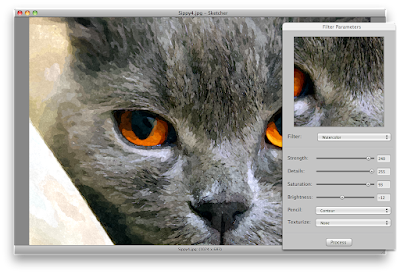
 I am happy to introduce you to a very nice app for the Mac, simply called Sketcher, which you can download here: http://neatberry.com/products/sketcher/
Even though it is not free, it is very reasonably priced. Here is a screenshot:
 As for Android, there are two versions of the PhoneSketch app.
One is 100% free (but doesn't allow you to save your works of art): https://market.android.com/details?id=com.wimolife.PhoneSketchFree&feature=search_result
The full app is very affordable: https://market.android.com/details?id=com.wimolife.PhoneSketch&feature=search_result
Here is a screenshot:
I hope you will enjoy playing with these apps.
Best regards,
David
See http://fotosketcher.blogspot.fr/2017/03/fotosketcher-for-mac-available.html
_____________________________________________________
Hi all,In the past months, I have been busy working in partnership with other developers to port some of the FotoSketcher algorithms to platforms other than Windows.
 I am happy to introduce you to a very nice app for the Mac, simply called Sketcher, which you can download here: http://neatberry.com/products/sketcher/
Even though it is not free, it is very reasonably priced. Here is a screenshot:

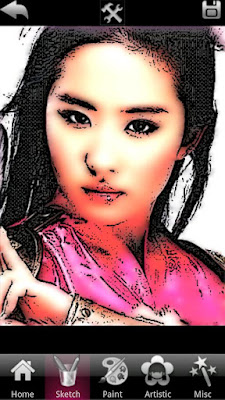
 As for Android, there are two versions of the PhoneSketch app.
One is 100% free (but doesn't allow you to save your works of art): https://market.android.com/details?id=com.wimolife.PhoneSketchFree&feature=search_result
The full app is very affordable: https://market.android.com/details?id=com.wimolife.PhoneSketch&feature=search_result
Here is a screenshot:

I hope you will enjoy playing with these apps.
Best regards,
David
Subscribe to:
Posts (Atom)