Hi all,
I'm currently working on the "Painting 10" effect in order to improve the painterly look. Here is an example on a portrait (click on image to view in full size):
Best regards,
David
Latest news, tutorials, previews and tips about FotoSketcher, the free program to turn photos into sketches and paintings.
To download go to www.fotosketcher.com
Sunday, December 20, 2015
Sunday, November 8, 2015
A nice video of my hometown
Hi all,
I'm currently working on version 3.30 of FotoSketcher for Windows and have also created a small Android app to test the possibility of creating a multi-platform version of FotoSketcher.
All this takes a bit of time, so to help you wait, here is a nice video of my hometown Lyon (or Lyons in English):
All the best,
David
I'm currently working on version 3.30 of FotoSketcher for Windows and have also created a small Android app to test the possibility of creating a multi-platform version of FotoSketcher.
All this takes a bit of time, so to help you wait, here is a nice video of my hometown Lyon (or Lyons in English):
All the best,
David
Saturday, August 29, 2015
For 64-bit Windows users
Hi all,
If you have a 64-bit version of Windows, you might want to download the new 64-bit portable version of FotoSketcher (available here: http://www.fosshub.com/FotoSketcher.html or here: http://www.fotosketcher.com/PortableFotoSketcher_3.20_x64.exe).
Processing speed is roughly the same as with the normal 32-bit version of FotoSketcher, but much larger images can be used without encountering 'out of memory' errors.
I have successfully tested with a 12 000 x 8 000 pixels source image at 300 dpi. Rendering was pretty slow though ;-)
Don't hesitate to let me know if you have any problems with this 64-bit version.
All the best,
David
If you have a 64-bit version of Windows, you might want to download the new 64-bit portable version of FotoSketcher (available here: http://www.fosshub.com/FotoSketcher.html or here: http://www.fotosketcher.com/PortableFotoSketcher_3.20_x64.exe).
Processing speed is roughly the same as with the normal 32-bit version of FotoSketcher, but much larger images can be used without encountering 'out of memory' errors.
I have successfully tested with a 12 000 x 8 000 pixels source image at 300 dpi. Rendering was pretty slow though ;-)
Don't hesitate to let me know if you have any problems with this 64-bit version.
All the best,
David
Friday, August 28, 2015
FotoSketcher 3.20 is officially released
Hi all,
FotoSketcher 3.20 is now officially released. As usual, you can download it here: http://www.fotosketcher.com/download-fotosketcher/
This version has better Windows 10 support, improved memory management (Pencil Sketch 1 and Linear Halftoning), a new popup window previewing each effect and various bug corrections.
Tip: If you wish to hide the new popup effect, simply edit the FotoSketcher.ini file (found in C:\Users\"username"\AppData\Roaming) and change True to False below the [Preview] line.
Have fun with FotoSketcher!
David
FotoSketcher 3.20 is now officially released. As usual, you can download it here: http://www.fotosketcher.com/download-fotosketcher/
This version has better Windows 10 support, improved memory management (Pencil Sketch 1 and Linear Halftoning), a new popup window previewing each effect and various bug corrections.
Tip: If you wish to hide the new popup effect, simply edit the FotoSketcher.ini file (found in C:\Users\"username"\AppData\Roaming) and change True to False below the [Preview] line.
Original photo copyright ASSOCIATED PRESS / MATT SAYLES
Have fun with FotoSketcher!
David
FotoSketcher is 100% free for personal and commercial use,
but if you feel overly generous, you can buy me a nice cup of coffee ;-)
Wednesday, August 26, 2015
FotoSketcher 3.20 beta 1 available
Hi all,
Thanks to the feedback of many of you I believe I now have a stable version of FotoSketcher 3.20.
Here is beta 1 which should be close to the final release (unless a last minute show stopping bug is found of course): http://www.fotosketcher.com/FotoSketcher_3.20_beta1.exe
This version adds a popup preview window next to the drop down list of effects, improves Windows 10 compatibility and memory management and also solves a number of bugs.
All the best,
David
Thanks to the feedback of many of you I believe I now have a stable version of FotoSketcher 3.20.
Here is beta 1 which should be close to the final release (unless a last minute show stopping bug is found of course): http://www.fotosketcher.com/FotoSketcher_3.20_beta1.exe
This version adds a popup preview window next to the drop down list of effects, improves Windows 10 compatibility and memory management and also solves a number of bugs.
All the best,
David
Sunday, August 16, 2015
FotoSketcher 3.20 alpha 5 - for testing purposes
Hi all,
If you like to be on the bleeding edge, here is an early version of FotoSketcher 3.20: http://www.fotosketcher.com/FotoSketcher_3.20_alpha5.exe
I have tried to improve compatibility with Windows 10 and reduce occasional window flickering. There is also a new preview window next to the drop down list of effects as shown here:
I have also optimized Pencil Sketch 1, which can now process larger images than before without giving an out of memory error (I have successfully tested on a 7000x4000 pixels image).
I have tested this version on a Windows 10 PC and on a Windows 7 virtual machine, so I would be grateful if you could let me know if you encounter any bugs on your PC.
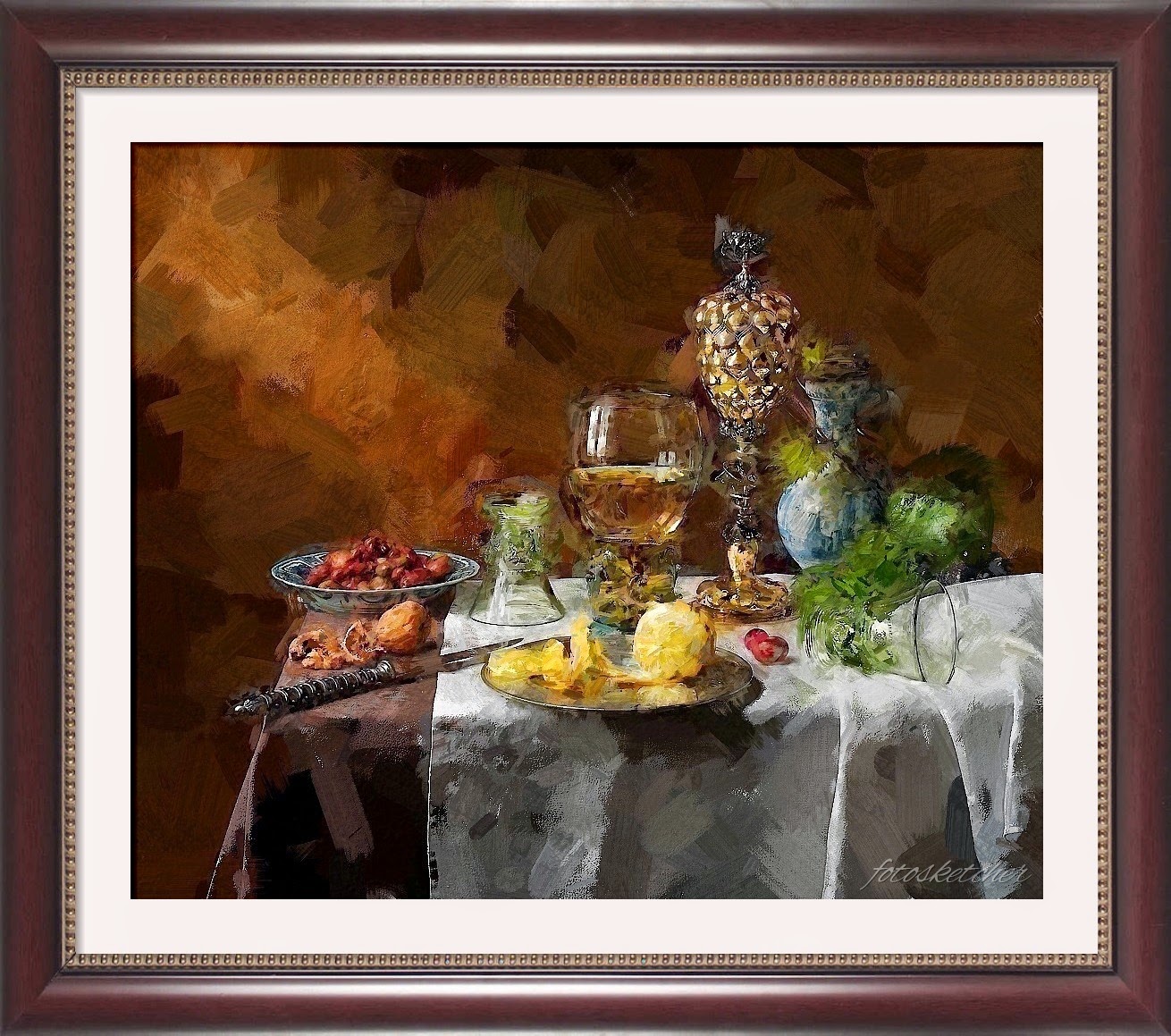
As a small bonus, here is a script file: http://www.fotosketcher.com/Painting9and10.zip. Unzip the file and open it in FotoSketcher's script window (F5). This is the output (source: Wikimedia commons):
All the best,
David
If you like to be on the bleeding edge, here is an early version of FotoSketcher 3.20: http://www.fotosketcher.com/FotoSketcher_3.20_alpha5.exe
I have tried to improve compatibility with Windows 10 and reduce occasional window flickering. There is also a new preview window next to the drop down list of effects as shown here:
I have also optimized Pencil Sketch 1, which can now process larger images than before without giving an out of memory error (I have successfully tested on a 7000x4000 pixels image).
I have tested this version on a Windows 10 PC and on a Windows 7 virtual machine, so I would be grateful if you could let me know if you encounter any bugs on your PC.
As a small bonus, here is a script file: http://www.fotosketcher.com/Painting9and10.zip. Unzip the file and open it in FotoSketcher's script window (F5). This is the output (source: Wikimedia commons):
All the best,
David
Wednesday, July 22, 2015
FotoSketcher 3.10 is officially released.
Hi all,
FotoSketcher has just been updated to version 3.10. As usual, you can download the official version (with setup or standalone) here: http://www.fotosketcher.com/download-fotosketcher/
This is a maintenance release, with quite a few bug fixes, optimizations and interface improvements. Here are some of the changes:
David
FotoSketcher has just been updated to version 3.10. As usual, you can download the official version (with setup or standalone) here: http://www.fotosketcher.com/download-fotosketcher/
This is a maintenance release, with quite a few bug fixes, optimizations and interface improvements. Here are some of the changes:
- the DPI default value has been set to 300 for better printing quality.
- although transparency in PNG images (alpha channel) is not supported by FotoSketcher, transparent pixels will no longer appear black. They will now be converted to white pixels (much prettier!).
- the donation screen (coffee cup icon) has been simplified and will lead to a unified PayPal screen.
- when using JPG images, the compression quality has been improved for fewer artifacts (save to PNG or BMP if you want maximum image quality).
- a visual bug with the Emergence 2 effect has been corrected. Sometimes the preview image would be pasted to the main result image in the top left corner.
- some z-order problems have been solved.
- a memory leak has been hunted down and solved.
- when running a script (F5), FotoSketcher will be automatically minimized until the end of the process. If you wish to see the script running, just click on the FotoSketcher icon in the Windows task bar.
David
Sunday, July 12, 2015
Working on FotoSketcher 3.10
Hi,
Just a quick word to let you know that I've been working on a new version of FotoSketcher which will solve a few problems. This will be a simple maintenance release, with bug fixes and performance enhancements (correction of memory leaks, default of 300 dpi instead of 72, interface improvements, etc.).
I'm also making progress on a new effect, but it's early days yet, so I will probably add it in a further release.
Regards,
David
Just a quick word to let you know that I've been working on a new version of FotoSketcher which will solve a few problems. This will be a simple maintenance release, with bug fixes and performance enhancements (correction of memory leaks, default of 300 dpi instead of 72, interface improvements, etc.).
I'm also making progress on a new effect, but it's early days yet, so I will probably add it in a further release.
Regards,
David
Saturday, March 7, 2015
FotoSketcher 3.00 is officially released. 100% free as always.
Dear all,
FotoSketcher 3.00 has been a bit long in the making but your patience is now rewarded :-)
You can download the official version (with setup or standalone) here: http://www.fotosketcher.com/download-fotosketcher/
New features and changes in version 3.00:
- New Painting 10 (brushstrokes) effect
- New "invert colors" function (in the Edit menu or CTRL+I shortcut)
- Integration of the "invert colors" function in the script mode (F5)
- Improved Painting 4 responsiveness
- Cosmetic changes to the user interface (especially when the program is maximized)
- New keyboard shortcuts (left, right and up keys) to move the divider between the left and right panes. Works when the main window is focused, even if an effect is running.
Have fun with FotoSketcher!
David
FotoSketcher 3.00 has been a bit long in the making but your patience is now rewarded :-)
You can download the official version (with setup or standalone) here: http://www.fotosketcher.com/download-fotosketcher/
New features and changes in version 3.00:
- New Painting 10 (brushstrokes) effect
- New "invert colors" function (in the Edit menu or CTRL+I shortcut)
- Integration of the "invert colors" function in the script mode (F5)
- Improved Painting 4 responsiveness
- Cosmetic changes to the user interface (especially when the program is maximized)
- New keyboard shortcuts (left, right and up keys) to move the divider between the left and right panes. Works when the main window is focused, even if an effect is running.
Here are a couple of examples of the new effect:
Original photo credit: https://www.flickr.com/photos/kevsyd/6300148573/
Have fun with FotoSketcher!
David
Friday, March 6, 2015
FotoSketcher 3.00 Release Candidate
Hi,
FotoSketcher 3.00 is finally almost ready to be released officially. You can download a stable beta version here: http://www.fotosketcher.com/FotoSketcher_3.00_RC1.exe
Here are the main changes :
- New Painting 10 (brushstrokes) effect
- New "invert colors" function (in the Edit menu or CTRL+I shortcut)
- Improved Painting 4 responsiveness
- Cosmetic changes to the user interface (especially when the program is maximized)
As usual, I welcome your feedback :-)
Best regards,
David
FotoSketcher 3.00 is finally almost ready to be released officially. You can download a stable beta version here: http://www.fotosketcher.com/FotoSketcher_3.00_RC1.exe
Here are the main changes :
- New Painting 10 (brushstrokes) effect
- New "invert colors" function (in the Edit menu or CTRL+I shortcut)
- Improved Painting 4 responsiveness
- Cosmetic changes to the user interface (especially when the program is maximized)
Example of the new Painting 10 effect (click on picture to view full size):
Original photo credit: Vincent MARTIN
As usual, I welcome your feedback :-)
Best regards,
David
Subscribe to:
Posts (Atom)


