Saturday, February 8, 2014

FotoSketcher 2.75 released - now available in Japanese

Hello all,

Just a quick word to let you know that FotoSketcher in now available in 22 languages, including Japanese (thank you very much for your help, Kazunori-san!).

As usual, head to http://www.fotosketcher.com/download-fotosketcher/ to download the latest version.

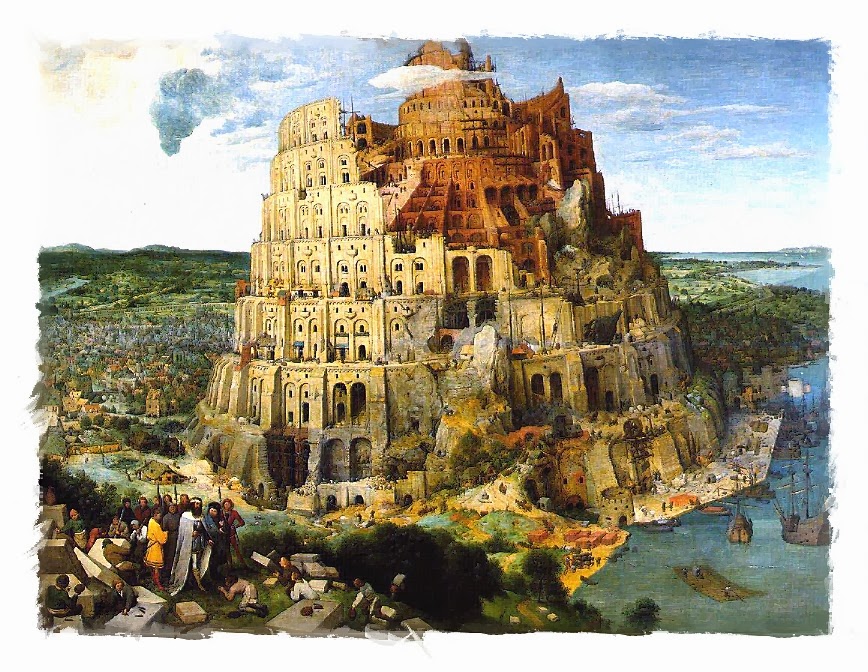
Here is a painting of Tokyo bay, made with FotoSketcher 2.75 (click on image for full view):

(source image credits: Spreng Ben - http://www.flickr.com/photos/37010090@N04/4419536377/) 

Have fun and be creative!

All the best,

David

Monday, January 27, 2014

Off topic - free Android game - Gem Genie

Hi all,

Disclaimer: This post is not about FotoSketcher, but if you have an Android phone or tablet you might be interested.

Just for fun, I recently wanted to learn Android programming and I have just finished a small (and not very original...) game which is available on Google Play.

You can get it for free (no ads, no in app purchase) here: https://play.google.com/store/apps/details?id=com.embarcadero.GemGenie

The app is a classic match 3 casual game (à la Bejeweled or Candy Crush), but obviously much more basic. Still I find it enjoyable so if you feel like it, why don't you try to beat the high score :-)

Here are a few screenshots:


Have fun,

David

Friday, January 24, 2014

Watercolor example, made with FotoSketcher 2.70

Hi all,

Here is a watercolor of my hometown Lyon (or Lyons) made with FotoSketcher 2.70 (click on image to see in full size).

The original photo was taken by photographer Mouhamad BZOU http://www.facebook.com/m.bzou.photography.


Before you ask :) I'm sorry I did not save the exact parameters I used, but I remember that I first ran the Painting 5 effect, then pressed F12 (to use the resulting picture as a new source) and then I ran the Painting 1 effect with color blending set to a high value (e.g. 160) and strength of effect to a low value (e.g. 5).
With FotoSketcher, experimenting is key!

All the best,

David

Friday, January 3, 2014

Happy New Year 2014!

Dear FotoSketcher users,

I wish you all a very happy new year :-)

Thank you for your support, feedback, suggestions and nice messages from all over the world.


Best regards,

David

Tuesday, December 10, 2013

FotoSketcher 2.70 officially released!

Hi all,

After ironing out a couple of small bugs, I've just officially released FotoSketcher 2.70. As usual, you can download it from the download page here: http://www.fotosketcher.com/download-fotosketcher/

The main changes in this version are user interface improvements, bug fixes and the addition of Portuguese:
  • New "minimize drawing parameters window" button on the parameters window (in the bottom right corner of the form)
  • New "script" button on the drawing parameters window (in the bottom left corner of the form)
  • New window style (Obsidian), which is lighter and more legible than the Charcoal default style
  • Better conservation of the current zoom level
  • Changes to the Z-order management of secondary windows (to avoid them getting hidden behind the main form)
  • Possibility to auto-show the Windows taskbar when running FotoSketcher in full screen
  • Painting 5 (watercolor) effect enhancement
  • Addition of Portuguese as a supported language


Best regards,

David

Sunday, December 8, 2013

FotoSketcher 2.70 beta available for testing

Hi all,

I am currently putting the finishing touches to FotoSketcher 2.70 and a stable beta version is available for testing.
You can download it directly here: FotoSketcher 2.70 beta 1

Here are the main changes in this version:
- user interface improvements:
  • added a "minimize drawing parameters window" button. When clicked, the drawing parameters window stays open, but minimizes automatically to the top left corner of the main window.
  • added a "script" button to the drawing parameters window to facilitate access to the script window (F5 still works of course)
  • added a new window style (skin) called Obsidian, which is lighter than the Charcoal default style (and more legible)
  • current zoom level is now saved more consistently

- effects enhancements:
  • Painting 5 (watercolor) has been modified slightly to give a more painterly result (by increasing color variation between adjacent regions)
- languages:
  • Portuguese is now a supported language, thanks to Carlo Moreira (muito obrigado!). Users from Portugal and Brazil should now see FotoSketcher automatically default to Portuguese when running the program for the first time.
Best regards,

David


Monday, November 25, 2013

Calling for a little help (Portuguese translation of FotoSketcher) ***updated***

***update*** Great thanks to Carlo M. who answered my call for help and sent me his translation! The next version of FotoSketcher (2.70) will therefore be available in Portuguese :-)


Hello all,

Thanks to some kind users, I have been able to add many languages to FotoSketcher. Here is the hall of fame of all translators who helped me:

For the next version of FotoSketcher which I'm currently working on, I would love to be able to add a Portuguese translation. If you are willing to help, please contact me through the contact form here http://www.fotosketcher.com/contact-us/ and I'll send you the terms to translate.


Thank you very much in advance,

David

Thursday, October 24, 2013

FotoSketcher 2.60 officially released! 100% free, as always :-)

Hello all,

FotoSketcher 2.60 is now ready for download.
Head to http://www.fotosketcher.com/download-fotosketcher/ to get the latest version.

Here are the main changes in version 2.60:
  • a brand new Painting 1 (watercolor) effect (which replaces the previous one)
  • a new 'brushstrokes' frame
  • a few bug fixes and interface improvements:
    • solved the filename bug when dragging and dropping an image (thanks Casey for spotting that one)
    • modified the naming convention to MyPhoto_FotoSketcher.jpg (better for sorting files alphabetically in a directory)
    • solved a transparency bug with png files
    • added a CTRL+S keyboard shortcut when an image is being processed to save an intermediate result
    • added a progress bar when creating the new brushstrokes frame (which can take a few seconds)

Here is an example of the new Painting 1 (watercolor) effect (click on image for full-size view):

and here are the parameters used:


As always, you can use FotoSketcher completely for free, even for commercial work.

Enjoy!

Best regards,

David


Sunday, October 13, 2013

FotoSketcher 2.60 Beta available for testing **updated**

** Post updated on 10/22/2013** Updates appear in red.

Hi all,

A new version of FotoSketcher is now available for testing. FotoSketcher 2.60 beta 2 can be downloaded here: http://www.fotosketcher.com/FotoSketcher_2.60_beta2.exe


The main changes are:
- a new Painting 1 effect (which replaces the previous one)
- a new 'brushstrokes' frame (with preview and 'in progress' icon)
- a few bug fixes and interface improvements (solved the filename bug when dragging and dropping an image, modified the naming convention to MyPhoto_FotoSketcher.jpg, solved a transparency bug with png files, added a CTRL+S keyboard shortcut when an image is being processed to save an intermediate result)

Here is an example of the new Painting 1 effect (click on picture for full view):
source image credit: http://photographpainter.de/venedig-hdr/

 and the parameters used:

There are still a few things that need to be polished, but you should be able to test version 2.60 with no problems.
Have fun!

All the best,

David

Sunday, October 6, 2013

FotoSketcher 2.60 beta available soon

Hi all,

Just a quick post to let you know that I'm currently putting the finishing touches to version 2.60. There is still a little tweaking and debugging to be done, but I should be able to release a test version soon.

The main change will be a new watercolor painting effect which will replace the current Painting 1 effect that I'm no longer happy with. Here is an example of the new painting filter (click on image for full-size view):


Stay tuned :)

Regards,

David