Friday, July 29, 2011

FotoSketcher 2.20 early beta available

Hi all,

I've just uploaded an early beta version of FotoSketcher 2.20 here: http://www.fotosketcher.com/FotoSketcher_beta.exe


The main new feature is the manual brush, which enables you to apply an effect to a specific portion of the image (with variable brush size and transparency).

I hope you'll like it and I look forward to your feedback :-)

Best regards,

David

Friday, July 8, 2011

Software similar to FotoSketcher for Mac and Android

*** 03/03/2017 update ***
See http://fotosketcher.blogspot.fr/2017/03/fotosketcher-for-mac-available.html

_____________________________________________________
Hi all,

In the past months, I have been busy working in partnership with other developers to port some of the FotoSketcher algorithms to platforms other than Windows.


I am happy to introduce you to a very nice app for the Mac, simply called Sketcher, which you can download here: http://neatberry.com/products/sketcher/

Even though it is not free, it is very reasonably priced. Here is a screenshot:


As for Android, there are two versions of the PhoneSketch app.
One is 100% free (but doesn't allow you to save your works of art): https://market.android.com/details?id=com.wimolife.PhoneSketchFree&feature=search_result

The full app is very affordable: https://market.android.com/details?id=com.wimolife.PhoneSketch&feature=search_result

Here is a screenshot:


I hope you will enjoy playing with these apps.

Best regards,

David

Wednesday, June 15, 2011

Upcoming feature: manual retouch brush

Hi all,

I'm currently working on a new feature for FotoSketcher: a mouse driven paintbrush which will allow finer control over specific portions of an image.

Let's take the example of the new Painting 8 (expressive brushstrokes) algorithm. If you use too small a brush size, the resulting painting may look too similar to the original photo. Conversely, if you use a larger brush, the painting may look too rough.

The manual brush will allow you to first render a painting with large and rough brustrokes, and then select the areas of the picture where you need finer details.

Here is an example on a photo of Sir Sean Connery (click on the images to view them full size). The brush size was set at around 100:

As you can see the eyes, nose and mouth brushstrokes need to be refined.

In the future release of FotoSketcher (2.20) you will be able to change the different parameters (for instance reduce the size of the brush to 25) and click on the areas you want to retouch (shown in purple):

When you release the mouse, the finer brushtrokes are automatically applied to the selected area. After a few similar retouches, here is the final result:


The possibilities are endless as I intend to make this manual brush available for most (if not all) effects, which means that you will also be able to apply different effects to different portions of your picture.

All the best,

David

Thursday, May 5, 2011

FotoSketcher 2.10 is officially released

Hi all,

FotoSketcher 2.10 is now officially released. As usual, you can download the new version here: http://www.fotosketcher.com/download.htm

If you already have FotoSketcher installed on your PC, there is no need to uninstall the previous version, it will be replaced automatically during setup.

Here are the new features in this version:
- new painting 8 (expressive brushstrokes) algorithm, with custom brush support
- automatic saving of current image directory and custom brushes directory
- 4 new languages (14 languages included now: Afrikaans, Arabic, Czech, Dutch, English, Finnish, French, German, Italian, Polish, Romanian, Russian, Spanish, Swedish)
- batch processing now supports also bmp and png formats (as well as jpg)
- various user interface improvements and bug fixes
- optional FotoSketcher browser toolbar (for Internet Explorer or Firefox), with direct access to the FotoSketcher application, homepage or Flickr group
- support for drag and drop of images from the web directly to FotoSketcher (drop an image to the left panel to open it as a new source image)

Thank you to all beta testers who gave me their feedback and also to the translators who help make FotoSketcher a multilingual application.

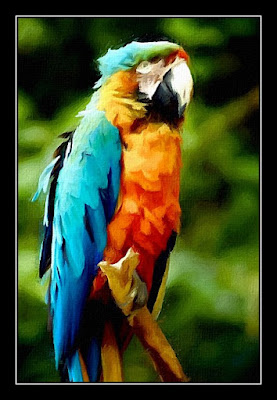
Here are a couple of examples of the new Painting 8 effect (photo credit stock.xchng):


Best regards,

David

Wednesday, April 20, 2011

Close to release...

Hi,

A quick word to let you know that I've finished debugging and tweaking the new painting algorithm (Painting 8 - expressive brushstrokes). I've used a softer brush than previously and have improved the brushstrokes' placement.


As usual, the beta version can be downloaded here: http://www.fotosketcher.com/FotoSketcher_beta.exe

I still have to add some new languages and will then be ready to release version 2.10.

All the best,

David

Sunday, March 20, 2011

New beta available

Photo credit: Sias van Schalkwyk (http://www.seepsteen.co.za/)


A new beta version has been uploaded. You can get it here: http://www.fotosketcher.com/FotoSketcher_beta.exe

The painting 8 filter has been fine tuned and is close to final.

All the best,

David

Tuesday, March 8, 2011

FotoSketcher 2.10 - early beta available

Hi!

I've just uploaded a new beta version of FotoSketcher 2.10 if you want to play with the new Painting 8 (expressive brushstrokes) effect. You can download it here: http://www.fotosketcher.com/FotoSketcher_beta.exe

The new effect is very processor intensive, so despite some optimizing it still takes a while to run. I suggest you don't use it on larger images ;-)

Here is an example of the new filter:


Don't hesitate to let me know what you think!

All the best,

David

Monday, February 21, 2011

Upcoming new effect: expressive brushstrokes

Hi all,

Still working on a new algorithm which uses brushtrokes (like the Painting 7 effect), but with a completely different stroke placement.
I think it gives a nicely expressive touch to the painting. Here is an example (click on the picture to enlarge):


I hope you'll like it.

Best regards,

David

Tuesday, February 15, 2011

Testing new ideas

Hi all,

I'm currently experimenting (fooling around) with new algorithms ideas. Here is an example on the famous parrot:
It's early days yet, but I think it could be promising.

All the best,

David

Tuesday, February 8, 2011

A fun time waster

As if you didn't waste time enough as it is with FotoSketcher, here is a piece of totally useless fun (crank up your speakers and click on the following image) :


Enjoy ;-)